|
|
|
|
|
This software was checked for viruses 22 days ago and was found to contain no viruses.
Click here
to see antivirus report.
|
|
| |
|
|
Video tutorial for Wise Disk Cleaner Free 6.3
|
|
Video tutorial for Wise Disk Cleaner Free 5.1
|
|
Video tutorial for Wise Disk Cleaner Free 4.9
This video tutorial has been acquired from Downloadtube.com
|
Review
This is official description
After a long use of you computer, Wise Disk Cleaner is the one that comes in handy. The application does a great job in cleaning out the registry junk and defragment the registry files to boost your PC. Wise Disk Cleaner is fast and safe when it comes to junk file cleaning. It has a powerful scan engine that safely locates the junk files in the system. To improve system performance, you can delete temporary and junk files, to increase the available disk space.
The following review written by one of the Software Informer contributors applies to version 4.9
Now, there are many such free disk cleaners available out there, but this is a very good utility. And what makes it different is that it is very fast, and uses much less memory and processor resources. A 500 GB hard disk with more than 8 lack files has been scanned in less than 8 minutes. It also has a great user interface.
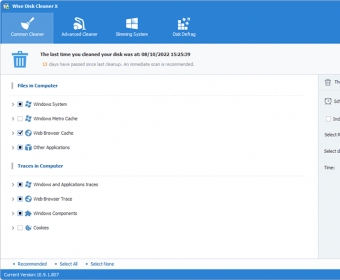
The program can be used by any novice user. It has a wizard-like interface at start-up. Descriptions for the different file types are given in the main window. So, we can decide whether to delete the files or not. As a default setting, all the important backup data, like the log files and *.bak (backup) files are ignored. But we can select them too to recover more disk space as most of them are not important for a regular home user.
We cannot deselect a particular file type after completing the scanning. We may only deselect the file or add it to the exceptions list from the scan list. The files are deleted to the recycle bin by default. Also, the program has nice sound schemes to notify various status.
In Windows XP systems, we can also delete the uninstall files of various OS updates. Well, the backup files for Windows updates can take a lot of space. These files may sometimes be needed to repair the installations, but most of the time, it is safe to delete them.
A disk defragmenting feature is available, but this program takes a lot of time. If you have Windows 7, it is better to use the Windows disk defragmenter. You can have a try on XP though. |
- Nice interface.
- Compatible with all Windows versions including 64-bit.
- Fairly fast scanning.
- Some settings are automatic for novice users.
|
- Disk defragmentation is slow and may not be that reliable.
- No diskScrubber and NTFS Undelete Tools in the free version.
|
|
Reviewed by: Zack Martin Reviewer rating: Reviewed: Last year
|
What's new in version 6.1
Enhance the security. Increase the speed of deletion under XP. Increase the speed of starting program under XP. Fix some bugs. Update in New glittery GUI. Very fast scan and clean speed. Deeply scan for useless files. New feature: System cleaner. What's new in version 3.9
1. Export entries to MS Excel.
2. New delete option - "Move to location".
Remove to recycle bin is very slow. And if you empty the recycle bin, you will not be able to restore those files that
you have deleted with Wise Disk Cleaner. When you use this new option, you can move all files to a designated
folder, and if you want to restore those files, you will find that it is very easy, because Wise Disk Cleaner 3 Pro
remembers the original location of each file. In addition, the program compresses these files, to save space.
3. Advanced Options.
Through these options, you can search files more accurately, for example, you can search old files and remove
them.
4. Comminuted delete files.
5. Disk Scrubber.
74% of discarded PC hard drives contain private data that can be easily read and recovered... even if the drive has been reformatted. Disk Scrubber of Wise Disk Cleaner will help you permanently to wipe deleted files for keep your private.
6. Deleted files Recovery tool: Effectively recover deleted files. Easy to use and fast. (Current only support NTFS drives and require Windows 2000 or above.) What's new in version 3.2
1. Fixed bug: Can not remove 'Remove Windows Updates's uninstall files'. 2. Add feature: Localation list add USB drive. 3. Fixed other several bugs. |
|
Report a wrong version
Report a wrong program title
Suggest a correction
|
Screenshots
All 22 screenshots |